
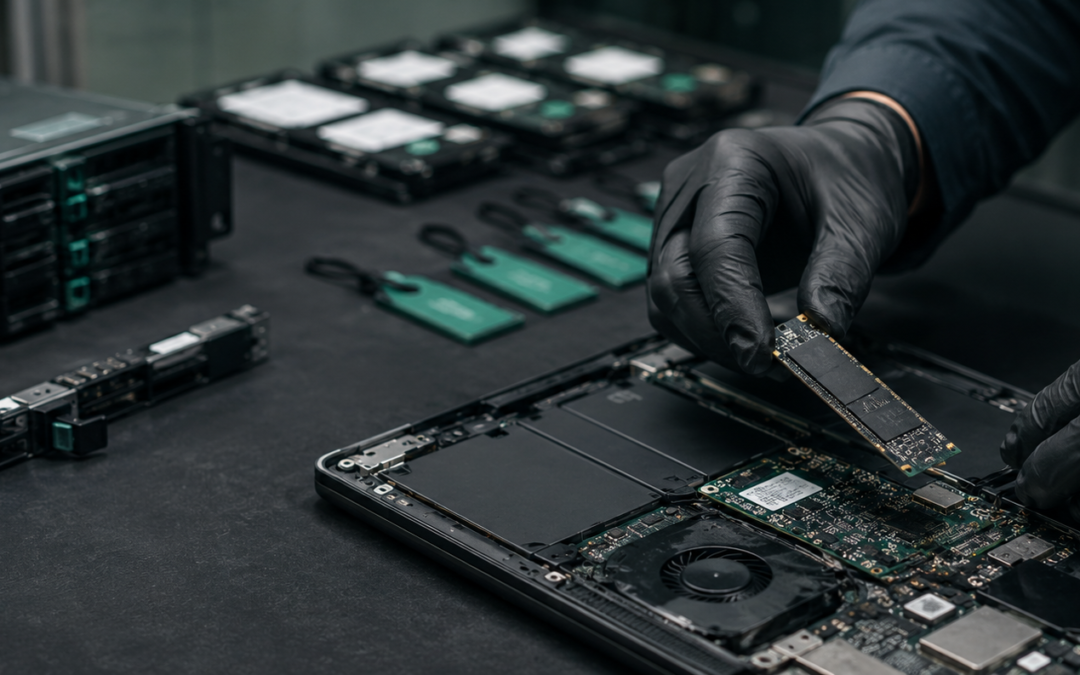

Data Wiping vs Physical Destruction
Choose the right route for each drive based on reuse, media type, condition, data risk and the evidence your organisation needs.
Use data wiping when the storage media works, the selected process suits that media, and your organisation allows equipment reuse. Choose physical destruction when policy forbids reuse, damage makes the media inaccessible, a wipe fails, or the organisation requires an irreversible physical outcome. Also, many business projects need both routes: wipe eligible devices, then send failed, restricted or end-of-life media to an agreed destruction process.
Make the decision before collection
What the two routes mean
Data wiping and physical destruction address the same business concern—retired media still holds information—but they produce different asset outcomes. Therefore, the choice should begin with what must happen after treatment, not with whichever machine or software sounds more secure.
Data wiping
Data wiping is a logical treatment intended to make data inaccessible while leaving suitable storage media or its host device available for an approved reuse, redeployment or recovery route. The process must suit the media, and the project team should verify the result rather than assume it.
Physical destruction
Physical destruction damages the storage media through an agreed method so it cannot return to normal use. The required method depends on the media, policy and risk. Do not present collection, recycling or a damaged casing alone as proof of destruction.
Neither route is automatically correct for every device. Wiping a failed drive may be impossible. Conversely, destroying every functional laptop drive can remove the equipment’s reuse value without improving a policy that already accepts an appropriate, verified wiping outcome.
In addition, the language matters. Deleting files, emptying a recycle bin and performing a basic factory reset do not necessarily deliver the same result as a planned wiping process. Singapore’s Personal Data Protection Commission has specifically cautioned that deleted or reformatted electronic data may remain recoverable. As a result, “we deleted everything” is not a sufficient project specification.
Source reviewed 13 September 2026: PDPC guidance on disposing of personal data.
Data wiping and destruction compared
| Decision point | Data wiping | Physical destruction |
|---|---|---|
| Asset outcome | A suitable device or drive may remain usable after treatment and assessment | The treated media can no longer return to normal use |
| Best fit | Working, supported media approved for reuse or value recovery | Failed, restricted, obsolete or policy-designated media |
| Dependency | The media must respond to a suitable process and complete it successfully | The destruction method must match the media and required outcome |
| Value impact | May preserve more equipment value where reuse is allowed | Eliminates the value of the destroyed media and may affect the host asset |
| Exception | Failed or inaccessible media needs another approved route | Embedded or overlooked storage must first be identified and removed or treated |
| Evidence | May include asset identity, method, result and exception status where agreed | May include media identity and destruction record where agreed |
The word “may” is deliberate. Reports, identifiers, methods and certificates are not universal inclusions. Define them in the project scope. In addition, make sure the evidence matches the completed work: a collection note confirms handover, while a wiping result or destruction record addresses a different stage.
Six questions that choose the route
1. Does policy allow reuse?
First, review policy and ownership. A device can be technically reusable yet restricted by contract, customer requirement, internal classification or lease terms. If policy allows reuse, wiping can preserve the asset for redeployment or value assessment. If policy prohibits reuse, do not let a possible resale value override the approved security decision.
2. What type of media is inside?
HDDs, SATA SSDs, NVMe drives, removable flash media, mobile devices and storage embedded in other equipment do not behave identically. Consequently, do not apply a method that works for one asset across the entire batch. Then record the media type or host-device category early enough to plan the route.
3. Does the media still work?
Logical wiping depends on the device responding correctly and completing the selected process. For example, bad sectors, damaged controllers, power faults or locked systems can interrupt that work. Therefore, every wiping project needs a defined failed-media route instead of treating an incomplete result as success.
4. How sensitive is the information?
Similarly, your organisation should connect the treatment decision to its data classification, contractual duties and risk tolerance. The most restrictive data does not automatically require the same physical method in every organisation, but it does require an explicit decision. Avoid asking a vendor to choose your risk appetite after the equipment has left the site.
5. What evidence will close the project?
For example, IT may need a device result, finance may need asset reconciliation, and security may need proof tied to the storage identifier. Those stakeholders should agree the requirements together. Otherwise, a project can complete the physical work yet still leave an internal reviewer unable to match the evidence to the original list.
6. Where must the treatment happen?
Finally, some organisations require work at their premises or want an authorised witness. Others permit controlled off-site processing. The location affects access, scheduling, equipment and cost. However, confirm Destruc’s current delivery scope in the quotation instead of assuming that every treatment method or reporting option is available on-site.
When data wiping makes sense
Wiping often offers the stronger commercial choice when working devices can return to use, reach lease end or qualify for value assessment. It separates the data decision from the hardware decision: the process treats the information while the useful equipment remains intact.
For example, a three-year-old business laptop may no longer meet an employee’s specification but may still suit another approved user or market. Destroying its storage by default can reduce the value of the complete device. By contrast, an agreed wiping process may preserve that option—provided the drive supports the process, the process completes, and your policy accepts the outcome.
Your organisation owns the asset and approves reuse; the media remains accessible; the team selects a suitable process; and the project checks and records the result at the required level.
Wiping is not the same as merely reinstalling an operating system. Also, a provider should not promise it universally for unknown or damaged media. Review Destruc’s dedicated data wiping service for the service scope, then confirm supported devices, methods, result records and exception handling for your project.
When physical destruction makes sense
Physical destruction is appropriate when the organisation has already decided that the storage media must not return to service. That decision may come from internal policy, a customer contract, the sensitivity of the information or the condition of the media.
It is also a practical exception route. A drive may be electrically dead, locked, physically damaged or unable to complete wiping. In that situation, repeatedly attempting the same logical process does not close the gap. The project needs a clear handoff from “wipe failed” to the approved physical route, with the exception attached to the correct asset or drive.
However, physical damage must be meaningful and media-aware. Drilling a random hole, bending an outer case or breaking a laptop does not demonstrate that all relevant storage components received the required treatment. Moreover, HDDs and SSDs store data differently. The project should identify the media and agree the method without relying on a generic phrase such as “destroy the computers”.
Use Destruc’s hard drive destruction page when physical destruction is already the chosen outcome. For a broader review of possible data-treatment routes, begin with secure data destruction.
Why mixed projects are often better
A fleet rarely contains only perfect reusable drives or only failed media. Assigning a route at asset level protects useful value without hiding the exceptions.
Identify
Match devices and storage to the available asset information.
Classify
Confirm media, condition, ownership and reuse permission.
Treat
Apply the agreed wiping or physical route.
Except
Move failed or mismatched items to an approved decision.
Reconcile
Return the agreed results against the project records.
HDDs and SSDs need different thinking
A hard disk drive stores data magnetically on spinning platters. An SSD stores it electronically across flash memory. That architectural difference affects which logical techniques and physical outcomes fit the media. Therefore, “we use the same process on every drive” should prompt more questions, not immediate confidence.
NIST SP 800-88 Rev. 2, published in September 2025, frames media sanitisation as a programme built around the sensitivity of the information, media characteristics and suitable controls. It superseded Rev. 1. The publication can help an organisation design its policy, but mentioning NIST does not prove that a provider follows it or that one method works across all media.
Modern estates add more complexity. Manufacturers may solder storage to a system board, while other equipment may hide it inside a multifunction device, distribute it across an array or protect it through encryption and management controls. Consequently, start with an equipment and media map. Ask where the data sits before a supplier prices the collection.
Technical source reviewed 13 September 2026: NIST SP 800-88 Rev. 2 Guidelines for Media Sanitization.
What useful evidence should answer
Good project evidence connects the scheduled asset, the treatment decision and the result. It does not need every imaginable field. Instead, it needs enough information for the people who approve the project to understand what happened and which items remain unresolved.
- Which identifier links the asset to the result?
- Which route applies to each item?
- Did the planned process complete?
- Which items entered an exception route?
- What happened to failed or inaccessible media?
- Which final document supports each service?
- Who owns unmatched or unapproved equipment?
- How will the team reconcile the final batch?
Define these questions before collection. Otherwise, the vendor may return a document that is accurate for its service but too broad for your internal asset register. Also keep document names precise: an inventory is not a wiping result, and a collection note is not a destruction record.
What to send Destruc
Start with the media and the required outcome. An incomplete list is acceptable for an initial review as long as the unknowns are clear.
- Device and media types
- Approximate quantities
- Asset tags or serial fields required
- Working, failed or unknown condition
- Reuse or recovery permission
- Internal policy or contractual requirement
- Collection and treatment location
- Required evidence and approvers
- Target dates and access restrictions
- Approved route for failed wiping
Tell Destruc what the data, assets and stakeholders require. The project can then separate media suitable for wiping from media that needs physical destruction, subject to confirmed service capabilities and scope.
Wiping and destruction FAQs
Direct answers for IT, security and procurement teams deciding how retired storage should be treated.
Is data wiping as secure as physical destruction?
It can be an appropriate security outcome when the media works, the selected process suits it, the result is verified and organisational policy permits reuse. Physical destruction serves a different outcome: the media is taken out of normal use. Security depends on the risk, media, method, controls and evidence—not the label alone.
Should every company hard drive be physically destroyed?
No universal rule requires every working company drive to be destroyed. Some organisations approve data wiping so suitable equipment can be reused or value-recovered. Others require destruction for particular classifications or contracts. Apply the organisation’s approved decision to each media type and define exceptions before collection.
Can an SSD be wiped?
Some SSDs can undergo an appropriate logical sanitisation process, but suitability depends on the device, its features, condition and the selected method. SSDs should not automatically receive an HDD-oriented process. Confirm the supported media and decide what happens if the SSD is inaccessible or cannot complete the planned treatment.
What happens when data wiping fails?
The item should enter a documented exception route rather than being recorded as successfully wiped. That route may involve another approved attempt, further assessment or physical destruction. Agree the decision owner, media identifier, handling steps and required evidence before processing begins.
Does a factory reset count as data wiping?
Do not assume so. A factory reset can serve a different purpose from a controlled wiping process, and the result varies by device. The PDPC has warned that deleting or reformatting electronic data may not remove it permanently. Define the intended sanitisation outcome and how completion will be checked.
Can wiped equipment be sold or reused?
Potentially, yes. Reuse also depends on ownership, condition, functionality, locks, configuration, policy and market demand. A successful data treatment addresses the information; it does not by itself prove that the complete device is suitable or authorised for redeployment or sale.
What proof should we request after treatment?
Request evidence that matches your project. Useful fields may include the asset or media identifier, assigned route, process result and exception status. Confirm the precise document and fields in the quotation. A collection note, inventory, wiping result and destruction record support different facts.
Can one project include wiping and physical destruction?
Yes. A mixed project can wipe working media approved for reuse and route failed, inaccessible or policy-restricted media to physical destruction. The important controls are asset-level routing, a defined exception path and reconciliation against the records agreed before collection.