
IT disposal and e-waste services
IT Disposal Services
With clear outcomes.
Destruc collects unwanted business IT, helps you control data risk and gives every asset a clear route for reuse, recovery or responsible recycling.
- Business collections
- Data handling options
- Clear asset outcomes

From collection to a clear final route
VisibilityClear asset route
DecisionReuse or recycle
Close-outProject record
Built for real-world IT clear-outs
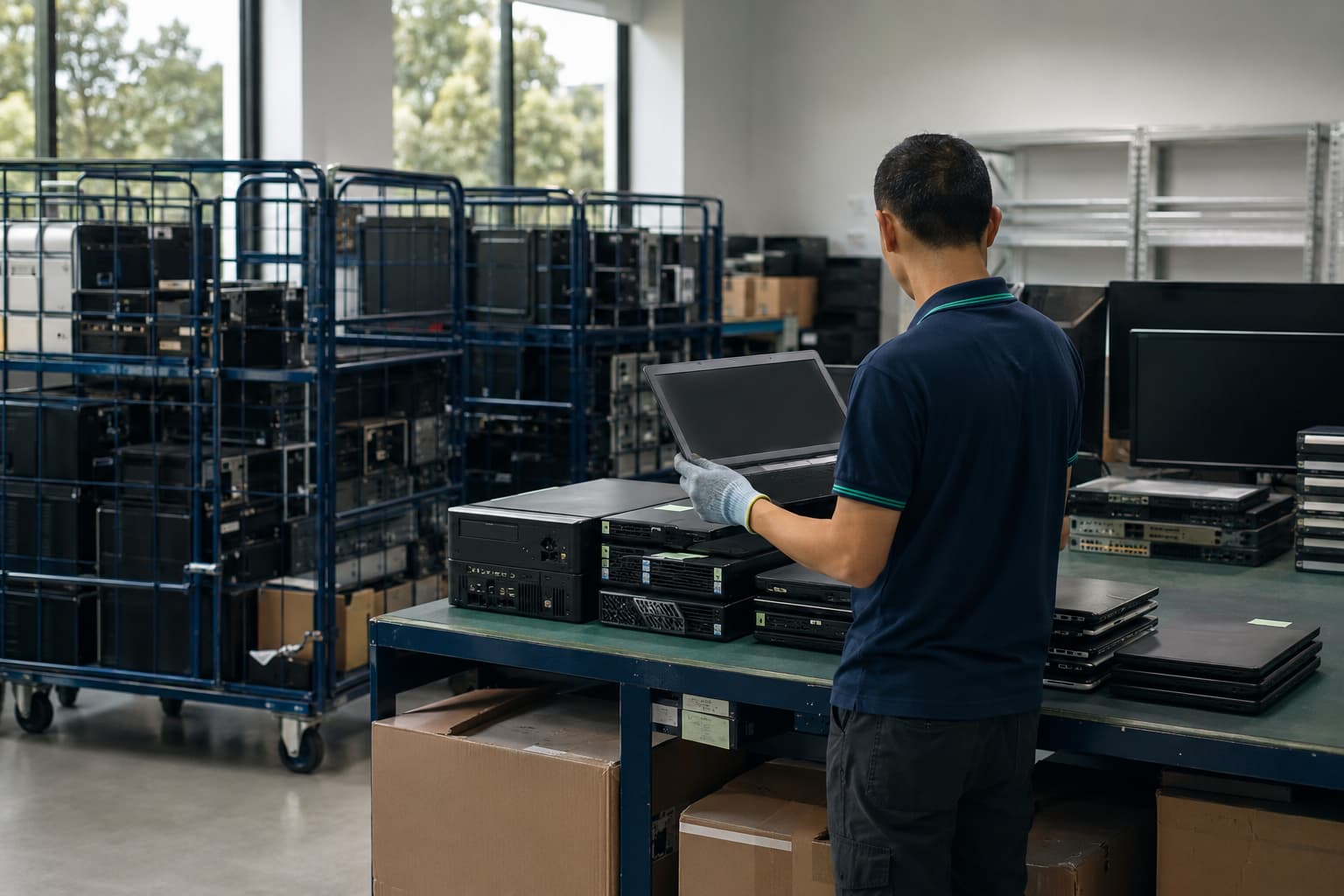
IT disposal and e-waste services
Clear the equipment you no longer use.
Old computers often stay in storerooms because nobody is quite sure what to do with them. Tell us what you have, where it is and when it needs to go. We will help you plan the next step.
You do not need a perfect equipment list to get started.
Request a quote03 Why Destruc
IT Disposal Services for Mixed Assets
It builds up under desks, inside storerooms and across different sites. Models, ages and conditions vary. Ownership changes. The list is often incomplete. That is normal—and it is exactly why a clear disposal plan matters.
01
Start with what you actually have
You do not need a perfect asset register before speaking to us. A rough count, a few photos or an existing list can be enough to begin the conversation.
02
Make the decisions before collection day
We clarify what is leaving, where it is located and which items may need separate handling. That keeps the collection focused and avoids last-minute guesswork.
03
Do not write off usable equipment too quickly
Condition matters. Where a practical second-life option exists, it should be considered before equipment is treated as waste.
04
Agree what a finished job looks like
Before work begins, tell us what information your team needs at the end. The handover should make sense to IT, operations and whoever approved the project.
Have equipment waiting in storage?Tell us what is there, even if the list is not perfect.
04 How it works
How Our IT Disposal Services Work
You do not need to solve the disposal problem before contacting us. Start with what you know. We will help shape the scope, prepare the collection and agree on the information your team needs afterwards.
Discuss your collectionStart here
Tell us what needs to leave
Share a rough item count, equipment list or a few photos. Let us know where the equipment is and when you hope to clear it.
- Equipment type
- Estimated quantity
- Site location
Shape the job
Agree on the scope
We confirm what is being collected, site access, timing and any items that may need separate attention before the work begins.
- Collection scope
- Access requirements
- Special handling notes
Collection day
Move the equipment out
The agreed items are collected from the nominated area. Clear access and an on-site contact help keep the handover straightforward.
- Named site contact
- Accessible collection area
- Agreed equipment ready
Close the loop
Confirm what happens next
Equipment is directed towards the agreed next step. We close the project around the outcome and information discussed at the start.
- Reuse where practical
- Recycling for end-of-life items
- Agreed project handover
Before you enquire
A perfect inventory is helpful. It is not required.
Equipment we can discuss
What is sitting in your office or storeroom?
Business IT rarely comes in one neat category. Use this list as a guide, not a fixed acceptance list. If an item is not shown, include it in your enquiry and we will confirm whether it can be collected.
Computers and displays
Laptops, desktops, workstations, thin clients and monitors.
Servers and storage
Rack and tower servers, storage appliances, NAS units and related hardware.
Network equipment
Switches, routers, firewalls, wireless access points and network appliances.
Phones and tablets
Business smartphones, tablets and other company-issued mobile devices.
Printers and office technology
Printers, scanners, desk phones, conferencing equipment and small office devices.
Cables and accessories
Chargers, adapters, docking stations, keyboards, mice and assorted cabling.
Data-bearing equipment
The equipment can leave. The data cannot be left to chance.
Retired laptops, servers, drives and phones may still hold business or personal data. Destruc provides data wiping and physical destruction, on-site or off-site, with records that help your team account for each asset.
Data wiping
For storage media that can remain in use, data is removed using an agreed wiping approach rather than relying on ordinary file deletion.
Physical destruction
Where reuse is not suitable or physical destruction is required, the data-bearing media is destroyed so the information cannot be recovered from it.
Where the work happens
On-site when the media should not leave your premises. Off-site when collection and controlled processing are the better fit.
Evidence for your records
Know what was collected, how it was handled and when the work was completed.
The project record can include asset-level information, serial numbers, collection details and the recorded outcome for each item. A certificate of destruction is provided for completed destruction work.
- Collection documentation
- Asset-level records
- Serial-number records
- Recorded wiping or destruction outcome
- Certificate of destruction
- Asset reference
- Recorded
- Serial number
- Recorded
- Service location
- On-site / off-site
- Method
- Wiped / destroyed
- Outcome
- Completed
Example fields only. Final records follow the agreed project scope.
Singapore’s PDPA requires organisations to make reasonable security arrangements for personal data and to stop retaining it when there is no longer a legal or business purpose. Destruc’s service records can support your disposal controls, but your organisation remains responsible for its own PDPA and sector-specific obligations.
Read the PDPC guidanceWho we work with
Different organisations. The same need for a clear handover.
A small office clearance and a structured enterprise disposal project do not need the same plan. Destruc works with businesses and organisations of different sizes, then shapes the collection, handling and records around the job in front of us.
For everyday equipment clear-outs, office moves and technology refreshes without unnecessary layers of process.
For projects that involve IT, facilities, procurement and other internal teams working towards the same handover.
For Singapore-based work that needs to fit established group policies, asset records and internal approval requirements.
For planned equipment retirement where scope, collection and supporting records need to be clearly agreed.
For practical disposal projects that help teams clear unwanted technology and understand what happens next.
Projects can begin with
A single office, a scheduled refresh or an entire site that needs to be cleared.
Frequently asked questions
Straight answers before you arrange an IT disposal project.
Every equipment list and site is different, but these are the questions businesses most often need answered before collection.
Ask Destruc a questionWhat is IT asset disposal?
IT asset disposal is the controlled retirement of technology that a business no longer needs. It can include collection, asset recording, data wiping, physical destruction, reuse assessment and e-waste recycling, depending on the equipment and project requirements.
What types of IT equipment can Destruc collect?
Destruc handles common business technology such as laptops, desktops, monitors, servers, storage devices, network equipment, phones, tablets, printers, cables and accessories. If an item is not listed, include it in your enquiry so we can confirm whether it can be collected.
Do I need a complete asset list before requesting a quote?
No. A complete asset list is helpful, but it is not required for the first conversation. You can begin with photos, approximate quantities, equipment types, the site location and your preferred timing. We will ask for any missing information needed to scope the work.
Does Destruc provide data wiping and physical destruction?
Yes. Destruc provides both data wiping and physical destruction for data-bearing equipment. Wiping may allow suitable storage media to remain in use. Physical destruction is used when the media should not be reused or destruction is required by the agreed project scope.
Is deleting files or formatting a drive enough?
No. Ordinary deletion or moving files to the recycle bin may leave data recoverable. Data-bearing media should be sanitised using an appropriate wiping method or physically destroyed when wiping is unsuitable or the project requires destruction.
Can data destruction be completed on-site?
Yes. Destruc offers on-site and off-site data destruction services. On-site work can be chosen when data-bearing media should remain at your premises until destruction. Off-site work can be arranged when collection and controlled processing are the better fit.
Will we receive a certificate of destruction?
Yes. Destruc provides a certificate of destruction for completed destruction work. The certificate forms part of the project record. Your organisation remains responsible for its own PDPA, retention and sector-specific obligations.
Do you record serial numbers and individual assets?
Yes. Destruc can provide asset-level and serial-number records as part of the agreed project scope. The record can show the equipment reference and the wiping or destruction outcome recorded for that item.
What collection documentation is provided?
Destruc provides collection documentation for the agreed handover. Depending on the project scope, this can sit alongside asset records, serial numbers, recorded outcomes and a certificate of destruction.
Can working equipment be reused instead of recycled?
Yes, where reuse is practical and fits the agreed data-handling requirements. Equipment condition, suitability and the required treatment of storage media should be reviewed before the next route is decided.
How should we prepare equipment for collection?
Group the agreed equipment in an accessible collection area and appoint an on-site contact. Tell us about loading access, lifts, stairs, building hours and any equipment that cannot be moved until a particular date or approval is received.
What should we disclose before collection?
Tell us about damaged or swollen batteries, loose batteries, printer consumables, unusually large equipment and non-IT items mixed into the clearance. These items may require separate preparation or handling.
Can Destruc help with an office move or site closure?
Yes. Destruc handles IT equipment clear-outs for office moves, technology refreshes, relocations and site closures. Share the move-out date, locations, access conditions and estimated equipment volume when requesting a quote.
What kinds of organisations does Destruc work with?
Destruc works with SMEs, multinational corporations, global enterprises, government agencies and non-profit organisations. The scope is shaped around the organisation, equipment volume, locations, data requirements and documentation needs.
What information is needed for an IT disposal quote?
Provide the equipment types, approximate quantities, location, access details, preferred timing and required data treatment. Photos or an existing asset list can make the initial review faster, but you can still enquire without a finished inventory.
Does outsourcing disposal remove our PDPA responsibility?
No. An organisation remains responsible for protecting personal data when disposal is outsourced. Destruc’s collection, asset, serial-number and destruction records can support your disposal controls, but they do not replace your organisation’s own PDPA and sector-specific responsibilities.
Still unsure? Send us a rough list or a few photos.
Talk to Destruc